

Google Business Profile
A Google Business Profile is the free listing that shows a business's details, photos and reviews on Google Search and Maps, managed by the business.
| Google Business Profile at a glance | |
|---|---|
| Also called | GBP; formerly Google My Business (GMB) |
| What it is | A free business listing on Google Search and Google Maps |
| Previous names | Local Business Center, Google Places, Google+ Local, Google My Business |
| Current name since | November 2021 |
| Who controls it | A verified owner or manager, together with Google and its users |
| Key restaurant fields | Hours, menu, photos, attributes, ordering and reservation links |
| Reviews | Written by guests; the business can reply but cannot delete them |
| Multi-location tools | Business Profile Manager, business groups and bulk verification for 10 or more locations |
| Where it appears | The Google local pack, Google Maps and the business panel in Search |
Key takeaways
- Your Google Business Profile is the listing guests see when they search for your restaurant or find it on Google Maps, and verifying it gives you control over its details.
- Accurate hours, a current menu, good photos and the right category are the parts of the profile most likely to influence whether a guest visits.
- Guests write the reviews and Google moderates them, so your influence comes from inviting every guest fairly and replying thoughtfully.
- Google enforces its guidelines with edits, removals and suspensions, which makes a real business name and a real address essential.
- For a restaurant group, managing every location from one account, with groups and consistent standards, is what keeps hundreds of profiles accurate.
What is Google Business Profile?
A Google Business Profile is the free listing Google shows for a business on Google Search and Google Maps. For a restaurant, it holds the details guests look for before they visit: address, opening hours, menu, photos, phone number, ordering and reservation links, and the reviews other guests have written.
Anyone can suggest edits to a profile and anyone can review it, but a verified owner or manager can control the business information, add photos and posts, and reply to reviews. That makes the profile one of the most visible pieces of your brand that you can actually manage.
It's also what appears in the Google local pack, the map and short list of places Google shows for searches such as "pizza near me". The profile is the listing; the local pack is one of the places where Google decides to show it.
Managing the profile well is the foundation of local SEO for restaurants.
How a Google Business Profile works
Google builds its picture of a business from several sources: what the owner enters, edits suggested by users, information from across the web, and the reviews and photos guests contribute. A verified owner can edit the profile directly, although Google may still update some details using information from other sources.
A guest usually meets your profile in one of three ways:
- A branded search. Someone searches for your restaurant's name and sees the profile in a panel beside or above the web results.
- A category search. Someone searches for "brunch" or "tacos near me" and your profile appears in the local pack or on the map.
- Google Maps. Someone browses the map, taps your pin and opens the full profile.
In each case, the guest sees the same information, so a wrong closing time or an outdated menu travels everywhere at once.
What a restaurant Google Business Profile contains
| Section | What it shows | Who mainly controls it |
|---|---|---|
| Name, category and address | Your real-world name, primary and additional categories, location on the map | Owner, checked by Google |
| Hours | Regular hours, special hours for holidays, and hours for services such as delivery | Owner |
| Menu | A menu link, menu photos or items entered in the menu editor | Owner and guests |
| Photos and videos | Your own photos alongside those uploaded by guests | Owner and guests |
| Attributes | Options such as dine-in, takeout, curbside pickup, outdoor seating or accessibility | Owner and guests |
| Ordering and reservations | Links to order online or book a table, often supplied by partners | Owner and partners |
| Posts | Updates, offers and events that appear on the profile | Owner |
| Reviews | Star ratings, written reviews and the owner's replies | Guests write; owner replies |
Google adds, renames and retires profile features regularly, so what you see in your own dashboard may differ slightly by country and category.
Google Business Profile verification
Verification is how Google confirms that you are the business and that you operate where the profile says. Until a profile is verified, your edits may not appear publicly, and you can't reply to reviews as the owner.
Google's help page on how to verify your business lists methods such as phone or text, email, video recording, live video call and mail. Google decides which methods each business is offered, and many businesses are now asked for a short video recording that shows the location and its signage.
Because significant edits, such as a new name or address, can mean verifying again, it helps to plan changes like a rebrand or a move with verification in mind.
Managing Google Business Profiles for many locations
For a restaurant group, the challenge is keeping dozens or hundreds of profiles accurate at once. Google provides a few tools for this, and most brands combine them with internal processes and software.
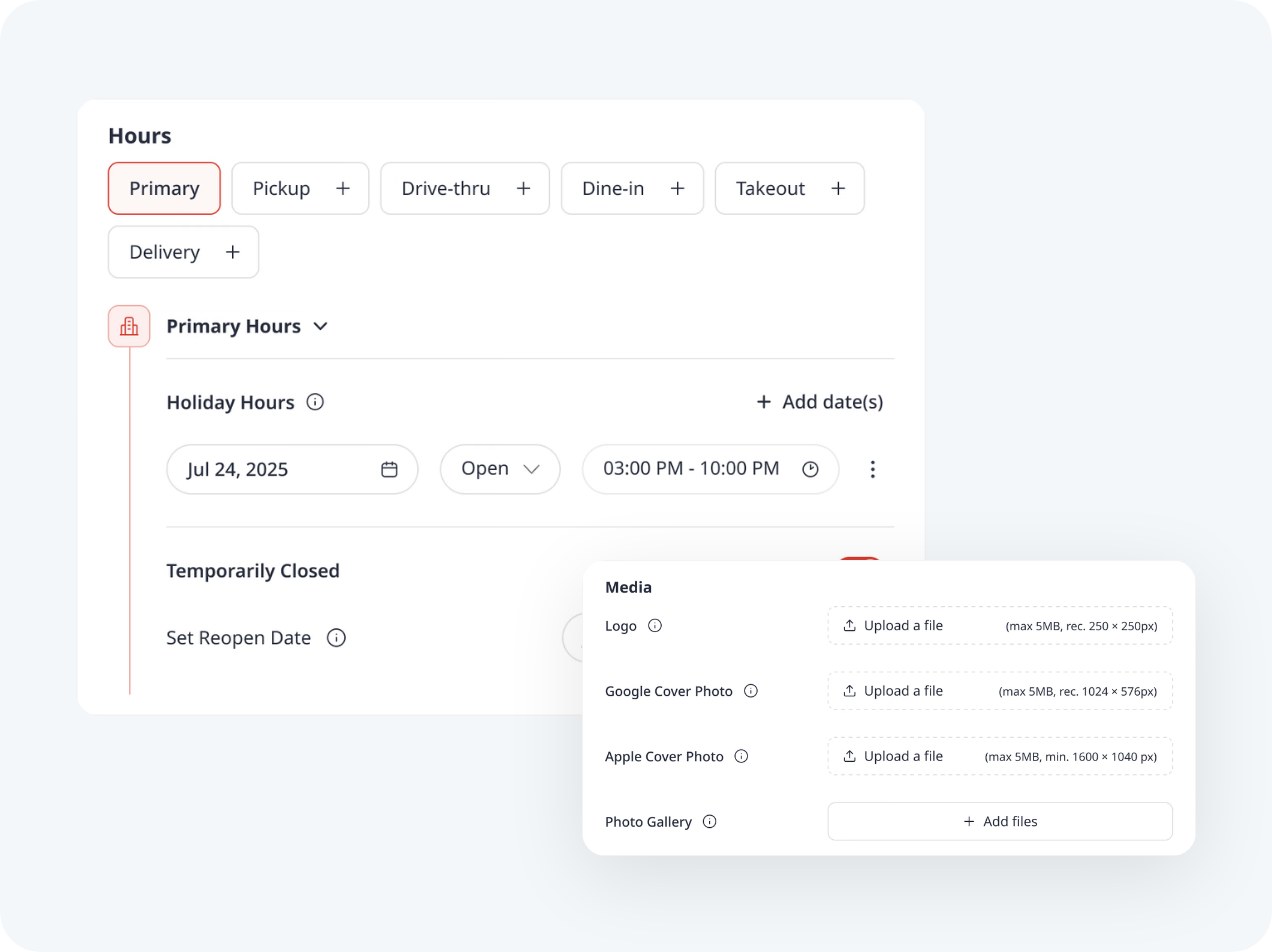
- Business Profile Manager. The web dashboard lists every location in one place and supports bulk edits, such as holiday hours across a region.
- Business groups. Locations sit in groups that can be shared with users, so a regional manager or agency sees only the profiles they need.
- User roles. Owners and managers have different permissions, which lets you keep ownership at brand level while giving local teams access.
- Bulk verification. Google's help page on bulk verification explains that businesses managing 10 or more locations of the same business may verify them together.
- APIs and partners. The Business Profile APIs let listings and review software read and update profiles for every location.
Consistency matters as much as accuracy. When every location uses the same naming format, categories and photo standards, guests get a reliable experience and your team can spot anomalies quickly. Many brands use listings management software to publish one source of truth to Google and other directories.
Google Business Profile guidelines and suspensions
Google's Guidelines for representing your business on Google set the rules for profiles. The core principle is that a profile should represent the business as it's consistently known in the real world, with its real name, a staffed address and accurate hours.
Common problems for restaurants include adding keywords or locations to the business name, listing an address the business doesn't operate from, and leaving duplicate profiles live after a move. Each can lead Google to edit the profile, remove it or suspend the account.
Google's help page on Business Profile restrictions describes measures for fake engagement, including temporarily blocking new reviews, unpublishing existing ones and showing a warning on the profile. Suspended profiles can be appealed after the underlying issue is fixed, so keeping a record of changes and ownership helps.
Review practices are part of the same rules. Google's content policies prohibit fake reviews, incentives for reviews and review gating, which is inviting only happy guests to post publicly.
Google Business Profile reviews and replies
Reviews are the part of the profile that guests write themselves. Each review adds to your average star rating and the review count shown beside your name, which are often the first numbers a guest compares between restaurants.
Owners can reply publicly to every review. Replies help in two ways: the reviewer sees that someone listened, and future guests see how you handle praise and criticism. Tracking your review response rate by location shows which teams keep up.
A business can't delete a review. It can report one that breaks Google's policies, such as spam, conflicts of interest or off-topic content, and Google decides whether to remove it. For fair but critical reviews, a calm, specific reply that acknowledges the issue is the better route, as described in negative review response.
A steady flow of new reviews comes from asking every guest consistently. Our guide on how to get more five-star Google reviews covers compliant ways to ask through receipts, QR codes and post-order messages.
Google Business Profile vs. local pack vs. website
| Google Business Profile | Google local pack | Your website | |
|---|---|---|---|
| What it is | Your listing on Google | A search feature showing a map and a few profiles | Pages you own and host |
| Who controls it | You, Google and guests | Google's ranking systems | You |
| Main role | Answer practical questions and convert searchers | Help searchers choose between nearby places | Tell your story, take orders, rank in web results |
| What you can change | Details, photos, posts, replies | Indirectly, through relevance and prominence | Everything |
The three work together. A complete profile gives Google the information it needs to show you in the local pack, and a strong location page on your website gives guests and Google more detail about each restaurant.
How to improve a Google Business Profile
The improvements that matter most are the ones guests notice when they decide where to eat. Google's own advice on local ranking also centers on complete, accurate information, which means the same work helps with visibility.
- Choose the most specific primary category. "Ramen restaurant" describes you better than "Restaurant", which helps Google match you to the right searches.
- Keep hours exact, including special hours. Setting holiday hours in advance prevents guests from arriving at a closed door, which is one of the fastest routes to a one-star review.
- Keep the menu current. A menu that matches your prices and dishes reduces surprises at the table and on delivery orders.
- Refresh photos regularly. Your own photos of dishes, the dining room and the exterior give guests a reliable picture alongside guest uploads.
- Complete the attributes. Dine-in, takeout, outdoor seating, accessibility and payment options answer practical questions before they're asked.
- Use posts for real news. Seasonal menus, events and offers give returning searchers a reason to visit again.
- Reply to reviews consistently. A routine for replying within a day or two keeps every location's reviews answered, and an AI review manager can draft replies in your brand's voice for busy teams.
Each location's profile works best when the brand sets the standards and the local team keeps the details true to what's happening in the restaurant.
Best Google Business Profile tools
The right tool depends on which part of the profile takes most of your team's time. Listings tools focus on publishing accurate details everywhere, while review tools focus on reading and replying to what guests write. For a restaurant group, multi-location reporting and clear permissions for regional teams matter in both.
| Tool | Best known for |
|---|---|
 MomosBest pick MomosBest pick | Guest AI for multi-location restaurants. Google reviews arrive in one Unified Inbox with reviews from reservation and delivery platforms, the Alfie assistant drafts and sends replies in your brand's voice, and reporting covers every location in one dashboard. |
 Yext Yext | Listings management that publishes business information to Google and other directories |
 Birdeye Birdeye | Reviews, listings and customer messaging for multi-location businesses |
 Reputation Reputation | Enterprise reputation management across reviews, listings and social media (formerly Reputation.com) |
 Chatmeter Chatmeter | Local brand reputation management with listings, review and sentiment analytics |
 Podium Podium | Review requests and customer messaging for local businesses |
Each of these tools covers a different mix of listings, reviews and messaging. Trialing one with a handful of your locations, including your busiest and your most remote, shows quickly whether it fits the way your teams work.
Common Google Business Profile mistakes
- Stuffing keywords into the business name. Adding "best pizza downtown" to your name breaks Google's guidelines and is a common reason for suspensions.
- Forgetting special hours. Holidays and private events without updated hours send guests to a closed restaurant.
- Leaving duplicates live. Old profiles from a move or a rebrand split reviews and confuse guests.
- Letting guest photos speak alone. Without your own recent photos, the first images guests see may be dark or outdated.
- Ignoring reviews at some locations. A brand average can hide locations where nobody replies, which future guests notice.
- Giving ownership to one person. When the only owner leaves, regaining access can take weeks, so keeping ownership in a brand account protects every location.
History of Google Business Profile
Google launched Google Local, a local business search service, in 2004 and merged it with Google Maps in 2005. Around the same time, the Local Business Center gave business owners a way to submit and correct their own listings, which is the direct ancestor of today's profile.
In April 2010, Google renamed the Local Business Center to Google Places. In May 2012, it rebranded Places as Google+ Local and tied business pages to its social network, which meant that managing a listing involved Google+ for several years.
In June 2014, Google brought the dashboards together under Google My Business, and existing accounts were upgraded automatically. In November 2021, Google announced the rename to Google Business Profile, encouraged single businesses to edit directly in Search and Maps, and renamed the web dashboard Business Profile Manager for businesses with several locations.
Features have kept changing since. Google ended the profile's chat and call history features on July 31, 2024. It discontinued the Q&A API on November 3, 2025, and in December 2025 it began replacing the public questions and answers on Maps with AI-generated answers drawn from a business's profile and reviews.
Frequently asked questions
What is a Google Business Profile?
A Google Business Profile is a free listing that shows a business's name, address, hours, photos, reviews and other details on Google Search and Google Maps. A business owner can claim and verify it to edit the information and reply to reviews.
Is Google My Business the same as Google Business Profile?
Yes. Google renamed Google My Business to Google Business Profile in November 2021. At the same time, it moved most editing for single businesses into Google Search and Maps, and renamed the web dashboard Business Profile Manager, which is aimed mainly at businesses with several locations.
Does a Google Business Profile cost anything?
Creating, verifying and managing a Google Business Profile is free. Google Ads can promote a business in Maps and Search, which is a separate, paid product. Google states that you can't pay for a better ranking in its unpaid local results.
How do I verify a restaurant's Google Business Profile?
Google offers verification by methods such as phone or text, email, video recording, live video call or mail, and it chooses which methods are available for each business. Brands with 10 or more locations of the same business may qualify for bulk verification.
Can I delete a bad review from my Google Business Profile?
No. A business can reply to any review and report one that breaks Google's content policies, and Google decides whether to remove it. A calm, specific public reply is usually the most effective response to a fair but negative review.
Why was my Google Business Profile suspended?
Suspensions usually follow a suspected breach of Google's guidelines, such as keywords added to the business name, an address the business doesn't operate from, or signs of fake reviews. Fixing the issue and then using Google's appeal process is the route back.
How many photos should a restaurant add to its Google Business Profile?
Google doesn't publish a target number. Recent photos of the dining room, exterior, signature dishes and menu help guests know what to expect, and refreshing them when the menu or decor changes keeps the profile accurate.